Case Study: Automated Email Classification & Routing Agent
An intelligent system that monitors a shared Outlook inbox, automatically classifying, prioritising, and routing incoming emails to the right teams — or sending an automated acknowledgement — within seconds.
Project Type
AI & Automation
Core Technologies
n8n, LLMs, Outlook
Sector
Public Services / General Business Operations
Impact
Faster Responses,
Reduced Admin Overhead
The Business Challenge
Shared inboxes often receive a large volume of mixed queries — from citizen service requests to complaints, procurement issues, and IT tickets. Staff must manually read, categorise, and escalate these messages, which is slow, inconsistent, and prone to error. Urgent safety-related messages risk being buried, and repetitive acknowledgement emails consume valuable time.
We developed an automated workflow in n8n that transforms a public inbox into a smart triage system. Incoming emails are automatically parsed, analysed by an LLM, validated against a strict schema, and routed with conditional logic. This ensures urgent cases get flagged, routine queries get acknowledged instantly, and staff only spend time on tasks that require human judgment.
The workflow connects to Outlook via IMAP and runs automatically when a new email arrives. Key details such as sender name, email address, subject, and body are parsed into structured variables. A carefully engineered prompt is sent to an OpenAI model with controlled temperature (0.2) and strict JSON output enforcement. The model classifies the email into one of several categories (e.g. Citizen Service, Complaint, Procurement, IT Help), assigns a priority (RED, YELLOW, GREEN), and generates a concise one-sentence summary. The workflow applies custom parsing and JSON schema validation to guarantee the output conforms to the required structure. This ensures reliable downstream routing regardless of model quirks. A Switch node checks the classification priority. The Solution: An AI Email Triage Assistant
The Automated Workflow:
1. Trigger on Incoming Emails
2. LLM Classification & Prompting
3. Schema Validation & Normalisation
4. Conditional Routing
RED (Urgent): Forwarded immediately to the appropriate response team with all details included.
YELLOW (Review): Routed to a review team for manual triage with context attached.
GREEN (Routine): An automated acknowledgement is sent back to the original sender confirming receipt and logging of their query.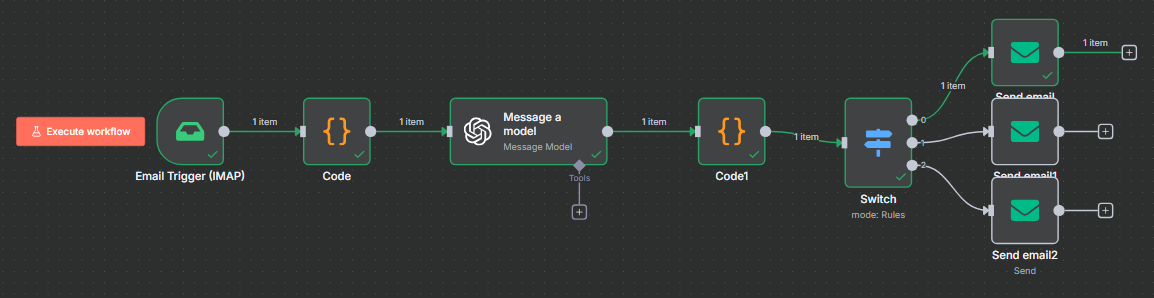
Key Outcomes & Business Impact
Have a challenge for us?
Let's discuss how our expertise can be applied to solve your organisation's unique data and AI challenges. Schedule a complimentary call today.